Prepare separately the following charts: 1) Scatterplot 2) Histogram/Column chart [in the histogram, within each class interval, draw also a vertical colored line where lies the true mean of the observations falling in that class] 3) Contingency table, using the graphics object and the Drawstring(), MeasureString(), DrawLine(), etc. methods. When done, merge these charts in your previous application 7_A. Use them to represent 2 numerical variables that you select from a CSV file. In particular, in the same picture box, you will make 2 separate charts: 1 rectangle (chart) will contain the contingency table 1 rectangle (chart) will contain the scatterplot, with the histograms/column charts and rug plots drawn respectively near the two axis (and oriented accordingly).
Some control miss. But i have fixed the problem with histogram and add the mean and the calculate of distribution. Fix also the proportion of height of histogram. Add also move and wheel for graph(table and scatterplot+histo)
Explain a unified conceptual framework to obtain all most common measures of central tendency using the concept of distance (or “premetric” in general).
Measures of Central Tendency
A measure of central tendency is a single value that attempts to describe a set of data by identifying the central position within that set of data. As such, measures of central tendency are sometimes called measures of central location. They are also classed as summary statistics.
The p-normand Lp spaces
(every vector from the origin to the unit circle has a length of one, the length being calculated with length-formula of the corresponding p).
For a real number p ≥ 1, the p-norm or Lp-norm of x is defined by:
The Euclidean norm from above falls into this class and is the 2-norm, and the 1-norm is the norm that corresponds to the rectilinear distance (Manhattan distance).
The length of a vector x = (x1, x2, …, xn) in the n-dimensional real vector space Rn is usually given by the Euclidean norm:
The Euclidean distance between two points x and y is the length ||x − y||2 of the straight line between the two points.
The function: defines a metric.
The Lp spaces are function spaces defined using a natural generalization of the p-norm for finite-dimensional vector spaces. In statistics, measures of central tendency and statistical dispersion, such as the mean, median, and standard deviation, are defined in terms of Lp metrics, and measures of central tendency can be characterized as solutions to variational problems, in the sense of the calculus of variations, namely minimizing variation from the center. In the sense of Lp spaces, the correspondence is:
In equations, for a given (finite) data set X, thought of as a vector x = (x1,…,xn), the dispersion about a point c is the “distance” from x to the constant vector c = (c,…,c) in the p-norm (normalized by the number of points n):
For p = 0 and p = +-∞ these functions are defined by taking limits.
Clustering
Instead of a single central point, one can ask for multiple points such that the variation from these points is minimized. This leads to cluster analysis, where each point in the data set is clustered with the nearest “center”.
Mode, median and mean
Hence, measures of central tendency help you find the middle, or the average, of a data set. The 3 most common measures of central tendency are the
mode: the most frequent value.
median: the middle number in an ordered data set.
mean: the sum of all values divided by the total number of value.
What are the most common types of means known? Find one example where these two types of means arise naturally: geometric, harmonic.
General or power mean
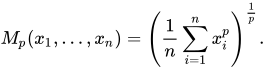
In mathematics, generalized means (or power mean) are a family of functions for aggregating sets of numbers, that include as special cases the Pythagorean means (arithmetic, geometric, and harmonicmeans). The generalized mean or power mean is:
It is generally referred as the average or simply mean. (p = 1).
Geometric mean
It indicates the central tendency or typical value of a set of numbers by using the product of their values (When p -> 0):
The geometric mean can be understood in terms of geometry. The geometric mean of two numbers, and b , is the length of one side of a square whose area is equal to the area of a rectangle with sides of lengths and . The geometric mean is used in finance to calculate average growth rates and is referred to as the compounded annual growth rate.
Harmonic Mean
Typically, it is appropriate for situations when the average of rates is desired(p = -1):
In computer science, specifically information retrieval and machine learning, the harmonic mean of the precision (true positives per predicted positive) and the recall (true positives per real positive) is often used as an aggregated performance score for the evaluation of algorithms and systems: the F-score (or F-measure). This is used in information retrieval because only the positive class is of relevance, while number of negatives, in general, is large and unknown. The weighted harmonic mean is used in finance to average multiples like the price-earnings ratio because it gives equal weight to each data point.
Explain the idea underlying the measures of dispersion and the reasons of their importance.
Dispersion
In statistics, dispersion (also called variability, scatter, or spread) is the extent to which a distribution is stretched or squeezed or, also, is a way of describing how spread out a set of data is. Common examples of measures of statistical dispersion are the variance and standard deviation.
Example of samples from two populations with the same mean but different dispersion. The red population is much more dispersed than the yellow population.
Dispersion is contrasted with location or central tendency, and together they are the most used properties of distributions.
Some measures of the dispersion
Range: is the simple measure of dispersion, which is defined as the difference between the largest value and the smallest value.
Standard Deviation: the most used method, It is a measure of spread of data about the mean.
Why necessary?
While measures of central tendency are used to estimate “normal” values of a dataset, measures of dispersion are important for describing the spread of the data, or its variation around a central value. Two distinct samples may have the same mean or median, but completely different levels of variability, or vice versa. A proper description of a set of data should include both of these characteristics.
When it comes to samples, that dispersion is important because it determines the margin of error you’ll have when making inferences about measures of central tendency, like averages. Show you the variability of your data.
Find out all the most important properties of the linear regression.
What is it?
In statistics, is a linear approach to modeling the relationship between a scalar response (or dependent variable) and one or more explanatory variables (or independent variables).
Linear regression finds the straight line, LSRL, that best represents observations in a bivariate data set. Suppose Y is a dependent variable, and X is an independent variable. The population regression line is:
Y = a + bX
where ‘a‘ is a constant and ‘b‘ the regression coefficient(in relationship to the angular coefficient).
The regression line has the following properties:
The line minimizes the sum of squared differences between observed values and predicted values
The regression line passes through the mean of the X values and through the mean of the Y values
The regression constant (a) is equal to the y intercept of the regression line.
The regression coefficient (b) is the average change in the dependent variable (Y) for a 1-unit change in the independent variable (X). It is the slope of the regression line.
Do a research about the real world window to viewport transformation.
What is?
Window to Viewport Transformation is the process of transforming a 2D world-coordinate objects to device coordinates. Objects inside the world or clipping window are mapped to the viewport which is the area on the screen where world coordinates are mapped to be displayed.
General Terms:
World coordinate – It is the Cartesian coordinate w.r.t which we define the diagram, like Xwmin, Xwmax, Ywmin, Ywmax
Device Coordinate –It is the screen coordinate where the objects is to be displayed, like Xvmin, Xvmax, Yvmin, Yvmax
Window –It is the area on world coordinate selected for display.
ViewPort –It is the area on device coordinate where graphics is to be displayed.
Mathematical Calculation of Window to Viewport:
It may be possible that the size of the Viewport is much smaller or greater than the Window. In these cases, we have to increase or decrease the size of the Window according to the Viewport and for this, we need some mathematical calculations.
(xw, yw): A point on Window
(xv, yv): Corresponding  point on Viewport
Where Sx and Sy are the scaling factor.
Exemple in C#
Manual trasforming.
// C# program to implement
// Window to ViewPort Transformation
using System;

class GFG
{

// Function for window to viewport transformation
static void WindowtoViewport(int x_w, int y_w,
							int x_wmax, int y_wmax,
							int x_wmin, int y_wmin,
							int x_vmax, int y_vmax,
							int x_vmin, int y_vmin)
{
	// point on viewport
	int x_v, y_v;

	// scaling factors for x coordinate
	// and y coordinate
	float sx, sy;

	// calculatng Sx and Sy
	sx = (float)(x_vmax - x_vmin) /
				(x_wmax - x_wmin);
	sy = (float)(y_vmax - y_vmin) /
				(y_wmax - y_wmin);

	// calculating the point on viewport
	x_v = (int) (x_vmin +
		(float)((x_w - x_wmin) * sx));
	y_v = (int) (y_vmin +
		(float)((y_w - y_wmin) * sy));

	Console.Write("The point on viewport: " +
				"({0}, {1} )\n ", x_v, y_v);
}

// Driver Code
public static void Main(String[] args)
{

	// boundary values for window
	int x_wmax = 80, y_wmax = 80,
		x_wmin = 20, y_wmin = 40;

	// boundary values for viewport
	int x_vmax = 60, y_vmax = 60,
		x_vmin = 30, y_vmin = 40;

	// point on window
	int x_w = 30, y_w = 80;

	WindowtoViewport(30, 80, 80, 80, 20,
					40, 60, 60, 30, 40);
}
}

// This code is contributed by PrinciRaj1992
Do a research with examples about how matrices and homogeneous coordinates can be useful for graphics transformations and charts.
Homogeneous coordinates
In mathematics, homogeneous coordinates are a system of coordinates used in projective geometry, as Cartesian coordinates are used in Euclidean geometry.
They have the advantage that the coordinates of points, including points at infinity, can be represented using finite coordinates. Formulas involving homogeneous coordinates are often simpler and more symmetric than their Cartesian counterparts. Homogeneous coordinates have a range of applications, including computer graphics and 3D computer vision, where they allow affine transformations and, in general, projective transformations to be easily represented by a matrix.
Any point in the projective plane is represented by a triple (X, Y, Z), called the homogeneous coordinates or projective coordinates of the point, where X, Y and Z are not all 0.
The point represented by a given set of homogeneous coordinates is unchanged if the coordinates are multiplied by a common factor.
Conversely, two sets of homogeneous coordinates represent the same point if and only if one is obtained from the other by multiplying all the coordinates by the same non-zero constant.
When Z is not 0 the point represented is the point (X/Z, Y/Z) in the Euclidean plane.
When Z is 0 the point represented is a point at infinity.
Matrix and trasformation
Using homogeneous coordinates allows to use matrix multiplication to calculate transformations extremely efficient!
Since a 2×2 matrix representation of translation does not exist, by using a homogenous coordinate system, we can represent 2×2 translation transformation as a matrix multiplication. A point (x, y) can be re-written in homogeneous coordinates as (xw, yw,w). The homogeneous parameterw is a non-zero value such that x and y coordinates can easily be recovered by dividing the first and second numbers by the third.
Do a comprehensive research about the GRAPHICS (GDI+ library) object and all its members.
Gaphics(GDI+ library)
Windows provides a variety of drawing tools to use in device contexts. It provides pens to draw lines, brushes to fill interiors, and fonts to draw text. MFC provides graphic-object classes equivalent to the drawing tools in Windows. The table below shows the available classes and the equivalent Windows graphics device interface (GDI) handle types.
GDI+ is a wrapper-library for traditional GDI. Conventional wisdom dictates that whenever a wrapper class calls another class, it must be slower than just the native class on its own. This is true with GDI+ as well. However, GDI+ performs exceptionally well and is often comparable to GDI itself. In fact, some operations such as filling complex shapes with a gradient is faster in GDI+ than in traditional GDI. This is possible because GDI+ internally uses calls that GDI does not expose, requiring many extra steps to get the same result.
Each graphic-object class in the class library has a constructor that allows you to create graphic objects of that class, which you must then initialize with the appropriate create function.
The System.Drawing namespace contains all GDI+ functionality (as well as a few sub-namespaces). GDI+ provides all the basic drawing features, such as drawing lines, curves, circles, ellipses, strings, bitmaps, and more. GDI+ also gives developers the ability to fill areas with colors, patterns, and textures.
Graphics object has a large number of methods that encapsulate drawing operations on a drawing “canvas.”
GDI+ Class and Interfaces in .NET
In Microsoft .NET library, all classes (types) are grouped in namespaces. A namespace is nothing but a category of similar kind of classes.
GDI+ is defined in the Drawing namespace and its five sub namespaces:
Do a research about Reflection and the type Type and make all examples that you deem to be useful.
Reflection…
Reflection is the ability of a managed code to read its own metadata for the purpose of finding assemblies, modules and type information at runtime. In other words, reflection provides objects that encapsulate assemblies, modules and types.
… example in C#
By using Reflection in C#, one is able to find out details of an object, method, and create objects and invoke methods at runtime. The System.Reflection namespace contains classes and interfaces that provide a managed view of loaded types, methods, and fields, with the ability to dynamically create and invoke types. When writing a C# code that uses reflection, the coder can use the typeof operator to get the object’s type or use the getType() method to get the type of the current instance.
typeof only works on types, not on variables, is static and does its work at compile time instead of runtime.
getType() get the type at execution time
If you need information about a non-instantiated type, you may use the globally available typeof() method
using System;
using System.Collections.Generic;
using System.Text;
using System.Reflection;

namespace ReflectionTest
{
    class Program
    {
        static void Main(string[] args)
        {
            string test = "test";
            Console.WriteLine(test.GetType().FullName);//System.String
            Console.WriteLine(typeof(Int32).FullName);//System.Int32
            Console.ReadKey();
        }
    }
}
// TypePropertiesDemo.cs
using System;
using System.Text;
using System.Reflection;

namespace Reflection
{
    class TypePropertiesDemo
    {
        static void Main()
        {
            // modify this line to retrieve details of any other data type
            // Get name of type
            Type t = typeof(Car);
            GetTypeProperties(t);
            Console.ReadLine();
        }
        public static void GetTypeProperties(Type t)
        {
            StringBuilder OutputText = new StringBuilder();

            //properties retrieve the strings
            OutputText.AppendLine("Analysis of type " + t.Name);
            OutputText.AppendLine("Type Name: " + t.Name);
            OutputText.AppendLine("Full Name: " + t.FullName);
            OutputText.AppendLine("Namespace: " + t.Namespace);

            //properties retrieve references
            Type tBase = t.BaseType;

            if (tBase != null)
            {
                OutputText.AppendLine("Base Type: " + tBase.Name);
            }

            Type tUnderlyingSystem = t.UnderlyingSystemType;

            if (tUnderlyingSystem != null)
            {
                OutputText.AppendLine("UnderlyingSystem Type: " +
                    tUnderlyingSystem.Name);
                //OutputText.AppendLine("UnderlyingSystem Type Assembly: " +
                //    tUnderlyingSystem.Assembly);
            }

            //properties retrieve boolean
            OutputText.AppendLine("Is Abstract Class: " + t.IsAbstract);
            OutputText.AppendLine("Is an Arry: " + t.IsArray);
            OutputText.AppendLine("Is a Class: " + t.IsClass);
            OutputText.AppendLine("Is a COM Object : " + t.IsCOMObject);

            OutputText.AppendLine("\nPUBLIC MEMBERS:");
            MemberInfo[] Members = t.GetMembers();

            foreach (MemberInfo NextMember in Members)
            {
                OutputText.AppendLine(NextMember.DeclaringType + " " +
                NextMember.MemberType + "  " + NextMember.Name);
            }
            Console.WriteLine(OutputText);
        }
    }
}
Output:
Analysis of type Car
Type Name: Car
Full Name: Reflection.Car
Namespace: Reflection
Base Type: Object
UnderlyingSystem Type: Car
Is Abstract Class: False
Is an Arry: False
Is a Class: True
Is a COM Object : False
… example in VB.Net
Try to instantiate an object from a dll without referencing it
Public Class Form1

Dim bytes() As Byte = System.IO.File.ReadAllBytes("\\path\directory\file.dll")
Dim assmb As System.Reflection.Assembly = System.Reflection.Assembly.Load(bytes)
'Load the assembly(a building block of a reusable common language runtime application) with a Common Object File Format (COFF) image containing a generated assembly. The assembly is loaded into the caller's application domain.

Dim myDllClass As Object = assmb.CreateInstance("myNamespace.myClass")

Private Sub Form1_Load(sender As Object, e As EventArgs) Handles MyBase.Load

    Dim conStr As String = myDllClass.publicConString
    Dim dt As DataTable = myDllClass.MethodReturnsDatatable("select * from Part", conStr)
    DataGridView1.DataSource = dt

End Sub
Type inference refers to the automatic detection of the type of an expression in a formal language. Such include programming languages, mathematical type systems but also natural languages in some branches of computer science and linguistic.
Types are a feature present in some strongly statically typed languages. The majority of them use a simple form of type inference; the Hindley-Milner type system can provide more complete type inference. The ability to infer types automatically makes many programming tasks easier, leaving the programmer free to omit type annotations while still permitting type checking.
If the type of a value is known only at run-time, these languages are dynamically typed. In some languages, the type of an expression is known only at compile time; these languages are statically typed. In most statically typed languages, the input and output types of functions and local variables ordinarily must be explicitly provided by type annotations. For example, in C:
int add_one(int x) {
    int result; /* declare integer result */

    result = x + 1;
    return result;
}
In a hypothetical language supporting type inference, the code might be written like this instead:
add_one(x) {
    var result;  /* inferred-type variable result */
    var result2; /* inferred-type variable result #2 */

    result = x + 1;
    result2 = x + 1.0;  /* this line won't work (in the proposed language) */
    return result;
}
So
Inferred type = set ONCE and at compile time. Actually the inferred part is only a time saver in that you don’t have to type the Typename IF the compiler can figure it out. Type Inference is often used in conjunction static typing (as is the case with swift)
var i = true; //compiler can infer that i most be of type Bool
i = "asdasdad" //invalid because compiler already inferred i is an Bool!
Dynamic type = no fixed Type -> type can change at runtime
id i = @YES; //NSNumber
i = @"lalala"; //NSString
i = @[@1] //NSArray
Of course, there’s no definite way to do this, but something like this may do the trick
TryParse
object ParseString(string str)
{
    int intValue;
    double doubleValue;
    char charValue;
    bool boolValue;

    // Place checks higher if if-else statement to give higher priority to type.
    if (int.TryParse(str, out intValue))
        return intValue;
    else if (double.TryParse(str, out doubleValue))
        return doubleValue;
    else if (char.TryParse(str, out charValue))
        return charValue;
    else if (bool.TryParse(str, out boolValue))
        return boolValue;

    return null;
}
Regex
bool isInt = new Regex(@"^\d+$").IsMatch(str);
bool isDouble = !(isInt) && new Regex(@"^\d+\.\d+$").IsMatch(str);
bool isChar = !(isInt || isDouble) && new Regex(@"^.$").IsMatch(str);
bool isString = !(isInt || isDouble || isChar);



 defines a metric.



 and b
and b  , is the length of one side of a square whose area is equal to the area of a rectangle with sides of lengths


 Statistics Course