Homework6_RA

Do a comprehensive research about the GRAPHICS (GDI+ library) object and all its members.

Gaphics(GDI+ library)

Windows provides a variety of drawing tools to use in device contexts. It provides pens to draw lines, brushes to fill interiors, and fonts to draw text. MFC provides graphic-object classes equivalent to the drawing tools in Windows. The table below shows the available classes and the equivalent Windows graphics device interface (GDI) handle types.

GDI+ is a wrapper-library for traditional GDI. Conventional wisdom dictates that whenever a wrapper class calls another class, it must be slower than just the native class on its own. This is true with GDI+ as well. However, GDI+ performs exceptionally well and is often comparable to GDI itself. In fact, some operations such as filling complex shapes with a gradient is faster in GDI+ than in traditional GDI. This is possible because GDI+ internally uses calls that GDI does not expose, requiring many extra steps to get the same result.

Each graphic-object class in the class library has a constructor that allows you to create graphic objects of that class, which you must then initialize with the appropriate create function.

The System.Drawing namespace contains all GDI+ functionality (as well as a few sub-namespaces). GDI+ provides all the basic drawing features, such as drawing lines, curves, circles, ellipses, strings, bitmaps, and more. GDI+ also gives developers the ability to fill areas with colors, patterns, and textures.

Graphics object has a large number of methods that encapsulate drawing operations on a drawing “canvas.”

GDI+ Class and Interfaces in .NET

In Microsoft .NET library, all classes (types) are grouped in namespaces. A namespace is nothing but a category of similar kind of classes.

GDI+ is defined in the Drawing namespace and its five sub namespaces:

  • System.Drawing Namespace
  • System.Drawing.Design Namespace
  • System.Drawing.Drawing2D Namespace
  • System.Drawing.Imaging Namespace
  • System.Drawing.Printing Namespace
  • System.Drawing.Text Namespace

https://docs.microsoft.com/en-us/cpp/mfc/graphic-objects?view=vs-2019
https://www.codemag.com/article/0305031
https://www.codeproject.com/Articles/4659/Introduction-to-GDI-in-NET

Homework5_RA

Do a research about Reflection and the type Type and make all examples that you deem to be useful.

Reflection

Reflection is the ability of a managed code to read its own metadata for the purpose of finding assemblies, modules and type information at runtime. In other words, reflection provides objects that encapsulate assemblies, modules and types.

… example in C#

By using Reflection in C#, one is able to find out details of an object, method, and create objects and invoke methods at runtime. The System.Reflection namespace contains classes and interfaces that provide a managed view of loaded types, methods, and fields, with the ability to dynamically create and invoke types. When writing a C# code that uses reflection, the coder can use the typeof operator to get the object’s type or use the getType() method to get the type of the current instance.

  • typeof only works on types, not on variables, is static and does its work at compile time instead of runtime.
  • getType() get the type at execution time
If you need information about a non-instantiated type, you may use the globally available typeof() method
using System;
using System.Collections.Generic;
using System.Text;
using System.Reflection;

namespace ReflectionTest
{
    class Program
    {
        static void Main(string[] args)
        {
            string test = "test";
            Console.WriteLine(test.GetType().FullName);//System.String
            Console.WriteLine(typeof(Int32).FullName);//System.Int32
            Console.ReadKey();
        }
    }
}
// TypePropertiesDemo.cs 
using System; 
using System.Text; 
using System.Reflection; 

namespace Reflection 
{ 
    class TypePropertiesDemo 
    { 
        static void Main() 
        { 
            // modify this line to retrieve details of any other data type 
            // Get name of type 
            Type t = typeof(Car); 
            GetTypeProperties(t); 
            Console.ReadLine(); 
        } 
        public static void GetTypeProperties(Type t) 
        { 
            StringBuilder OutputText = new StringBuilder(); 

            //properties retrieve the strings 
            OutputText.AppendLine("Analysis of type " + t.Name); 
            OutputText.AppendLine("Type Name: " + t.Name); 
            OutputText.AppendLine("Full Name: " + t.FullName); 
            OutputText.AppendLine("Namespace: " + t.Namespace); 

            //properties retrieve references        
            Type tBase = t.BaseType; 

            if (tBase != null) 
            { 
                OutputText.AppendLine("Base Type: " + tBase.Name); 
            } 

            Type tUnderlyingSystem = t.UnderlyingSystemType; 

            if (tUnderlyingSystem != null) 
            { 
                OutputText.AppendLine("UnderlyingSystem Type: " +
                    tUnderlyingSystem.Name); 
                //OutputText.AppendLine("UnderlyingSystem Type Assembly: " +
                //    tUnderlyingSystem.Assembly); 
            } 

            //properties retrieve boolean         
            OutputText.AppendLine("Is Abstract Class: " + t.IsAbstract); 
            OutputText.AppendLine("Is an Arry: " + t.IsArray); 
            OutputText.AppendLine("Is a Class: " + t.IsClass); 
            OutputText.AppendLine("Is a COM Object : " + t.IsCOMObject); 

            OutputText.AppendLine("\nPUBLIC MEMBERS:"); 
            MemberInfo[] Members = t.GetMembers(); 

            foreach (MemberInfo NextMember in Members) 
            { 
                OutputText.AppendLine(NextMember.DeclaringType + " " + 
                NextMember.MemberType + "  " + NextMember.Name); 
            } 
            Console.WriteLine(OutputText); 
        } 
    } 
}

Output:

Analysis of type Car 
Type Name: Car 
Full Name: Reflection.Car 
Namespace: Reflection 
Base Type: Object 
UnderlyingSystem Type: Car 
Is Abstract Class: False 
Is an Arry: False 
Is a Class: True 
Is a COM Object : False

… example in VB.Net

Try to instantiate an object from a dll without referencing it

Public Class Form1

Dim bytes() As Byte = System.IO.File.ReadAllBytes("\\path\directory\file.dll")
Dim assmb As System.Reflection.Assembly = System.Reflection.Assembly.Load(bytes)
'Load the assembly(a building block of a reusable common language runtime application) with a Common Object File Format (COFF) image containing a generated assembly. The assembly is loaded into the caller's application domain.

Dim myDllClass As Object = assmb.CreateInstance("myNamespace.myClass")

Private Sub Form1_Load(sender As Object, e As EventArgs) Handles MyBase.Load

    Dim conStr As String = myDllClass.publicConString
    Dim dt As DataTable = myDllClass.MethodReturnsDatatable("select * from Part", conStr)
    DataGridView1.DataSource = dt

End Sub

https://docs.microsoft.com/it-it/dotnet/api/system.type.getfield?view=netcore-3.1
https://www.codeproject.com/Articles/55710/Reflection-in-NET
https://www.codemag.com/Article/0211161/Reflection-Part-1-Discovery-and-Execution
https://stackoverflow.com/questions/30128583/object-instantiation-using-reflection-works-in-vb-net-but-not-c-sharp

Homework7_A – Homework8_A

Create – in your preferred language C# or VB.NET – a program which is able to read ANY file CSV (or at least 99% of them), assuming no prior knowledge about its structure (do not even assume to that a first line with variable names is necessarily present in the CSV: when not present, clearly, do some useful automatic naming).
Also, some data preprocessing should be carried out on the data (or a suitable subset) in order to empirically establish the most suitable type of data of each field and, thus, give a preliminary tentative choice of data types for the variable fields to the program user (which he can, then, try to change on the GUI at his will before attempting to read the file)

OPT 8_A. In the previous program 7_A, as a verification, plug the code you have already developed for computing the mean and the (univariate) statistical distribution, and allow the user to select any variable and compute the arithmetic mean (only when it makes sense) and the distribution. [Make this general enough, in anticipation of next homework program, where we will also add bivariate distributions and, in general, multivariate distributions, with various charts.]

VB.Net code

Source(Application7_n file folder)

https://drive.google.com/file/d/1vF2iwXClFHLlPakOl7rq1nIPLShcjanC/view?usp=sharing

Solution txt format

https://drive.google.com/file/d/1tw9dYnnNOFm-DER0wALCu-jWjXn5IJYu/view?usp=sharing

A little explaination

Take data with dialog

Imports Microsoft.VisualBasic.FileIO
...
 Private Sub BtnDialog_Click(sender As Object, e As EventArgs) Handles BtnDialog.Click
        Dim o As New OpenFileDialog
        o.ShowDialog()
        If o.FileName IsNot Nothing Then
            Me.TxtFile.Text = o.FileName
        End If

    End Sub
...

Read the data.
First I read the first line

...
Public Sub Read_frist_line()
...

        Using reader As New TextFieldParser(path)

            reader.CommentTokens() = New String() {"#"}
            reader.Delimiters = New String() {","}
            reader.HasFieldsEnclosedInQuotes = True

            Dim values() As String = reader.ReadFields
            Dim i As Integer = 0
            For Each v In values
                TreeView1.Nodes(0).Nodes.Add(v).Tag = i
                dicOfType.Add(i, Choose_type(v.GetType.ToString))
                i += 1
            Next
...

        End Using


    End Sub
...

I store the information building a treeview, so for check about ‘metadata’ I work on it:

...
 Public Function Exist_metadata() As Boolean
        If Me.CheckBox1.Checked Then
            metadataFlag = False
            Return False
        Else
            For tagNode = 0 To TreeView1.Nodes(0).Nodes.Count - 1
                If Different_fromString(tagNode) Then
                    metadataFlag = False
                    Return False
                End If
            Next

        End If
        Return True

    End Function
...

If they don’t exist change the tree.

Csv without first line

For try to understand the right tipe, first of take all data i use

Empirically_type(reader) and Suitable_type()

when I read the first line.

...
    Public Sub Suitable_type()
        Dim nParent As Integer = Me.TreeView1.Nodes(0).Nodes.Count
        For n = 0 To nParent - 1
            Research_typeString(Me.TreeView1.Nodes(0).Nodes(n).Text, n)
        Next

    End Sub
...

With Research_typeString I try to understand information with some tipical name:

Imports System.Text.RegularExpressions
...
Public Sub Research_typeString(txt As String, n As Integer)
        Dim dateMatch As New Regex("(\w*time\w*)|(\w*date\w*)", RegexOptions.IgnoreCase)
        Dim soldMatch As New Regex("(\w*\$\w*)|(\w*\$\w*)", regexOptions.ignoreCase)
        Dim numberMatch As New Regex("(\w*number\w*)", RegexOptions.IgnoreCase)
        Dim unitMatch As New Regex("(\w*kg\w*)| (\w*cm\w*)|(\w*metre\w*)|(\w*height\w*)|(\w*weight\w*|(\w*length\w*)|(\w*width\w*))", RegexOptions.IgnoreCase)

If dateMatch.IsMatch(txt) Then
            Dic_containKey(dicOfSuitType, n)
            dicOfSuitType(n).Add(GetType(DateTime))
        End If
...

End Sub

Instead, with empirically_type, I try to understand reading the second line of file, parsando ogni elemento.

Public Sub Empirically_type(reader As TextFieldParser)

        Dim values() As String = reader.ReadFields()

        For v = 0 To values.Count - 1
            dicOfEmpType.Add(v, ParseString(values(v)).GetType)
        Next

    End Sub

dicoOfEmpType and dicOfSuitableType are used to store the recommended data, and then show it at the user when click on data.

Summing up, I read the first line, try to elaborate the data and only then do I read the other lines of the file, and complete the treeview.

I try also to write extra control for avoid bug or unexpected things.

Some controls

Choose a variables in treeview i try to calculate avg and freq. distribution:

Homework9_R

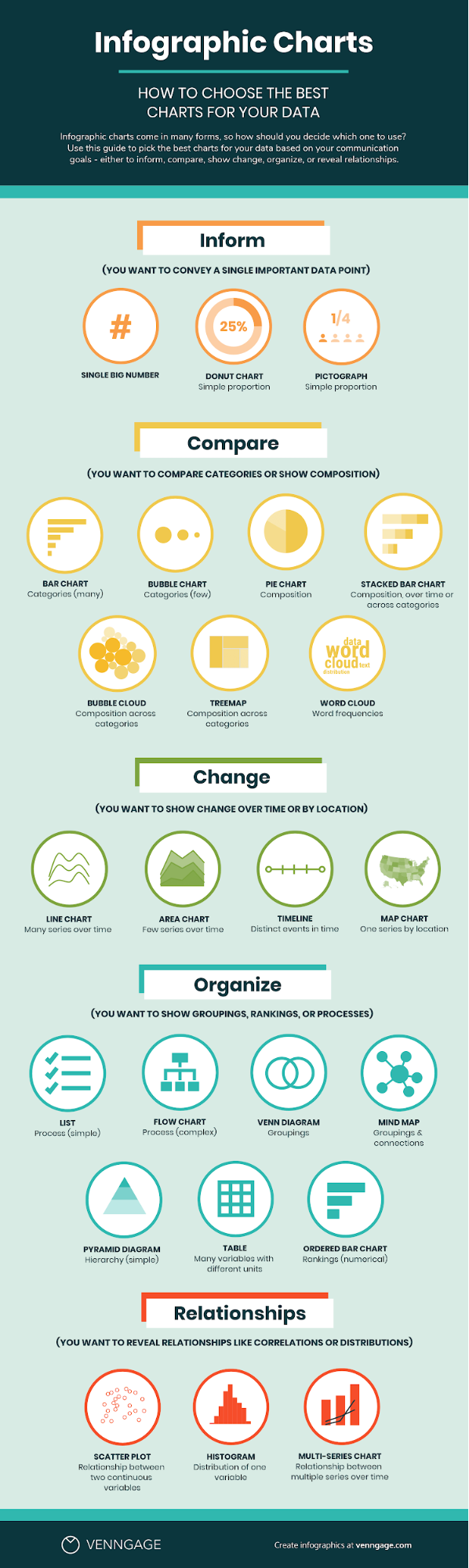
Do a review about charts useful for statistics and data presentation (example of some: StatCharts.txt ). What is the chart type that impressed you most and why ?

https://www.maketecheasier.com/assets/uploads/2019/09/chart-google-slides-featured-image.jpg

What is Data Visualization?

The human mind is very receptive to visual information. That’s why data visualization is a powerful tool for communication.    

Data visualization is the visual presentation of data or information. The goal of data visualization is to communicate data or information clearly and effectively to readers. Typically, data is visualized in the form of a chart, infographic, diagram or map. 

Charts use visual symbols like line, bars, dots, slices, and icons to represent data points. 

What type of chart should I use to visualize my data? Does it matter?

Yes, it matters. Choosing a type of chart that doesn’t work with your data can end up misrepresenting and skewing your data. 

Pie charts display portions of a whole. A pie chart works when you want to compare proportions that are substantially different. But when your proportions are similar, a pie chart can make it difficult to tell which slice is bigger than the other. That’s why, in most other cases, a bar chart is a safer bet.

How to Pick Charts Infographic Cheat Sheet

I have often used pie charts or column charts. But in a university course I had the need to use the bubble chart, programming the filling of the ‘buckets’ myself in matlab, thus being able to have information clearly, through the size of these bubbles. Very cool!

https://venngage.com/blog/data-visualization/

Homework8_R

Explain the concept of statistical independence and why, in case of independence, the relative joint frequencies are equal to the products of the corresponding marginal frequencies.

Statistical independence and marginal frequencies

If the frequency, for alla i, of xi fixed yj is equal for all j and is also equal to the marginal, then x and y are indipendent.

This can be seen more easily by looking the shape, that are the same, for all fixed Y or X.
It is therefore obvious that one variable does not depend on the other.

F(x,y) is the joint distribution function and Fx and Fy are the marginal ones.

https://math.stackexchange.com/questions/1789265/understanding-statistical-independence-of-events-using-a-relative-frequency-inte

https://www.researchgate.net/post/Why_is_it_so_that_only_for_bivariate_multivariate_normal_uncorrelated_distribution_implies_independence_and_not_other_distribution

Homework7_R

Explain what are marginal, joint and conditional distributions and how we can explain the Bayes theorem using relative frequencies.

Why different distributions

When we have a bivariate distribution, we can represent it with a Contingency table. In this table we can define different type of distribution.

Marginal Distribution

The marginal distribution take us back to the univariate case (we ignore the other variable) and is called marginal because in the contingency table is a the marginal.


Specifically, the relative marginal frequencies of X are defined as:

and of Y:

Join Distribution

The join distribution is the element nij in the table. And it represent how many times a combination of two conditions happens together.

Conditional Distribution

The conditional frequency distribution of Y given X is the frequency distribution of Y when X is known to be a particular value.

The conditional frequency distribution of X given Y is the frequency distribution of X when Y is known to be a particular value.

The distribution is constrained by the fact that they fall into the fixed class (of x or y)

Relative Frequency

With this definition we can say:

The Bayes Thm

http://www.est.uc3m.es/esp/nueva_docencia/comp_col_get/lade/estadistica_I/doc_generica/Tema3inglesImp.pdf
https://en.wikipedia.org/wiki/Bayes%27_theorem